Menu Kit
Main menu, pause menu, settings, credits and an async loading screen for Unreal Engine. Every screen is a normal Widget Blueprint you can move, retext and restyle in the UMG designer, and every setting really changes the game.
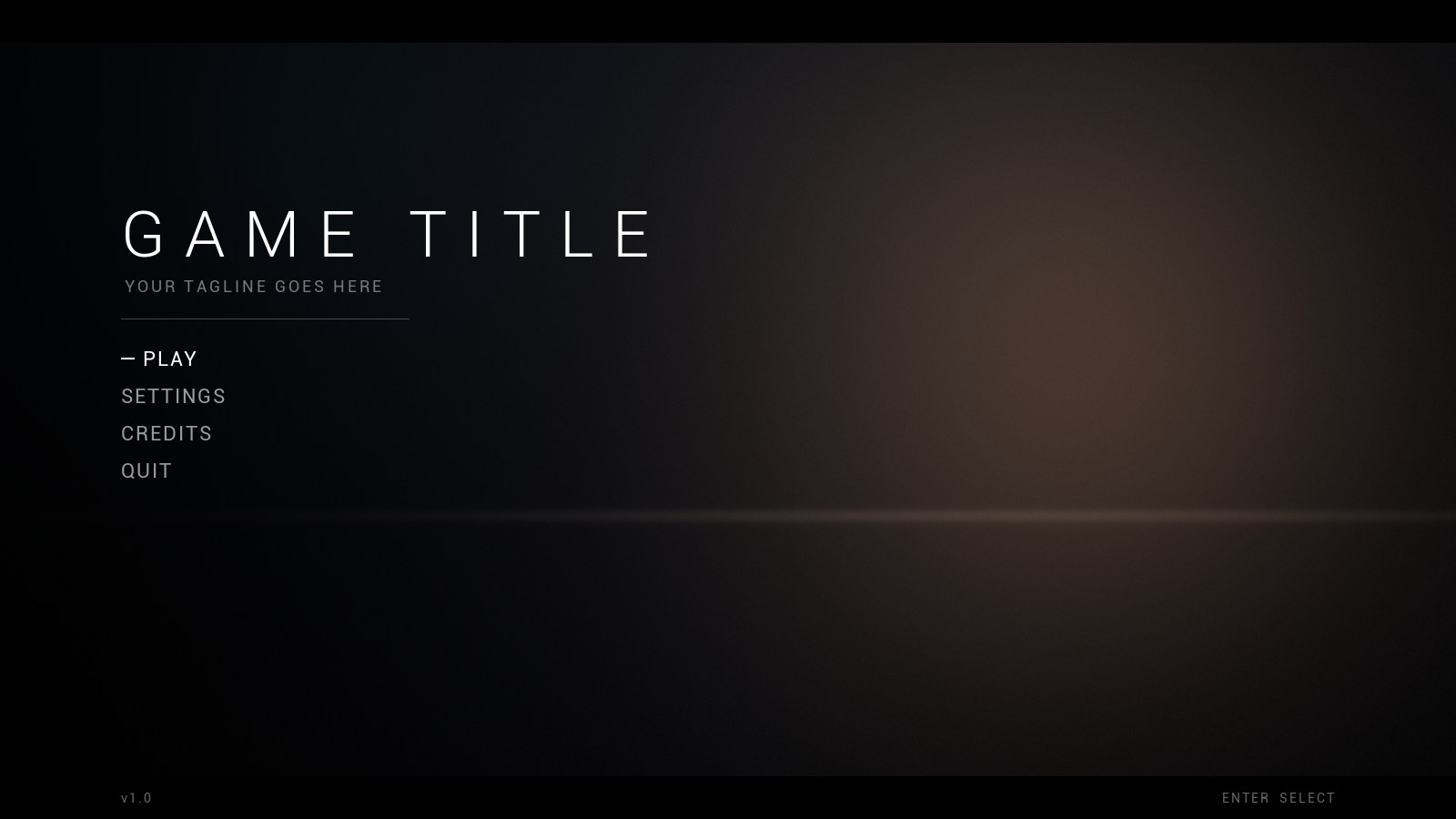
Menu Kit, free
The full plugin with every screen working, in one clean animated style. Free for any project, commercial ones too.
- Price
- Free
- Status
- Available
- Engine
- Unreal Engine 5.6 and 5.8, Windows
- Support
- Community help on Discord
Free with a Wrennick account. Sign in with Discord or Google, it takes a few seconds.
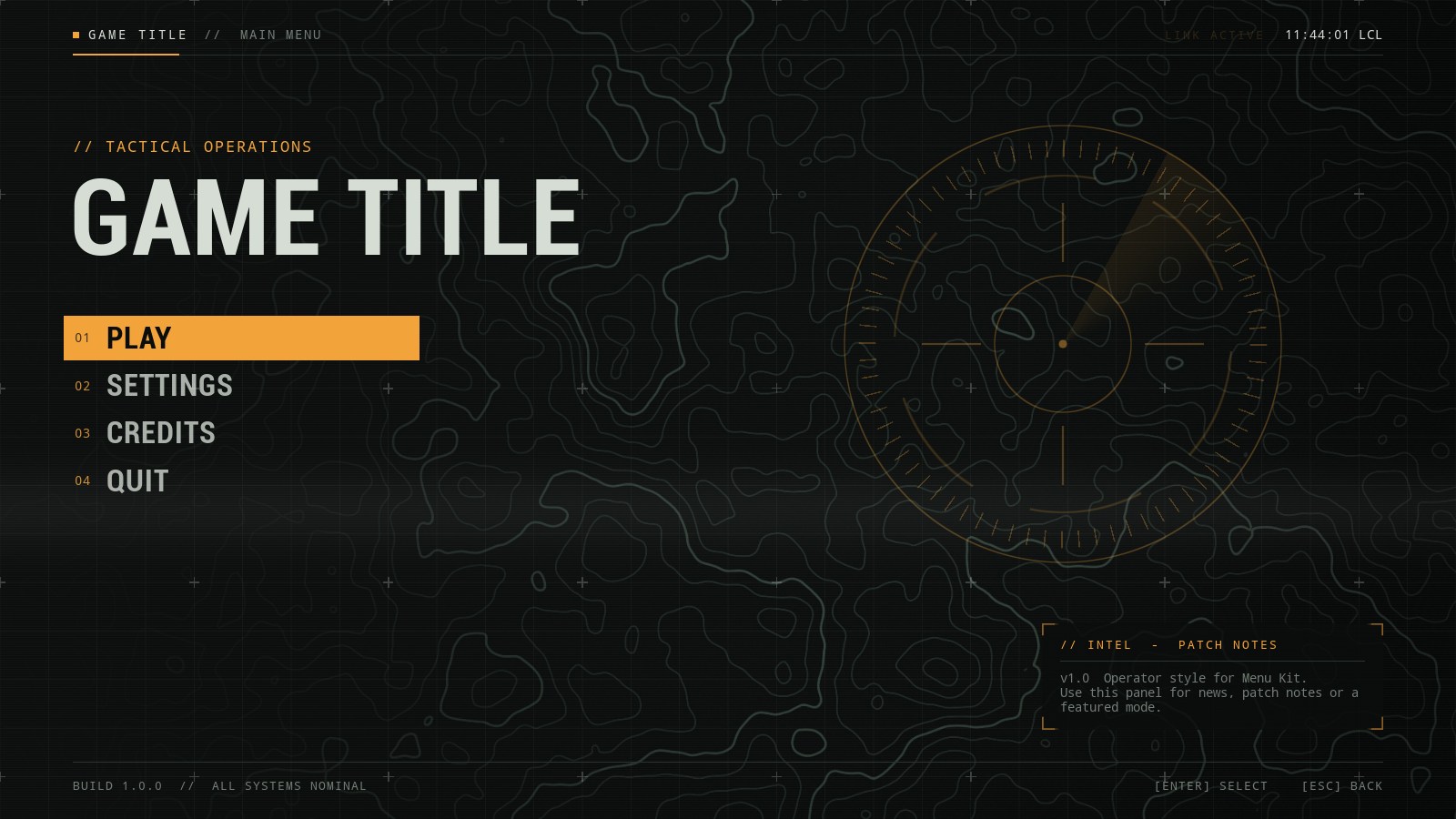
Operator style
Operator turns your menus into a field terminal. A slow topographic map and a scanning reticle sit behind a fine grid, the title decodes itself letter by letter, and a live clock ticks in the corner. Buttons flicker when you select them and screens snap in hard and fast. Made for shooters, tactical and military games, and anything with a sci-fi interface.
- Every Menu Kit screen in the Operator style
- Animated topographic map, grid, scanline and reticle backgrounds
- Decoding text, live clock and flicker on selection
- Fast, glitchy screen transitions
- Condensed and monospace fonts included
- Price
- €10 one-time, VAT included
- Needs
- The free Menu Kit
- Engine
- Unreal Engine 5.6 and later
- Support
- Priority email support
Payment and receipt by Stripe. Already bought it? Download it from your account.
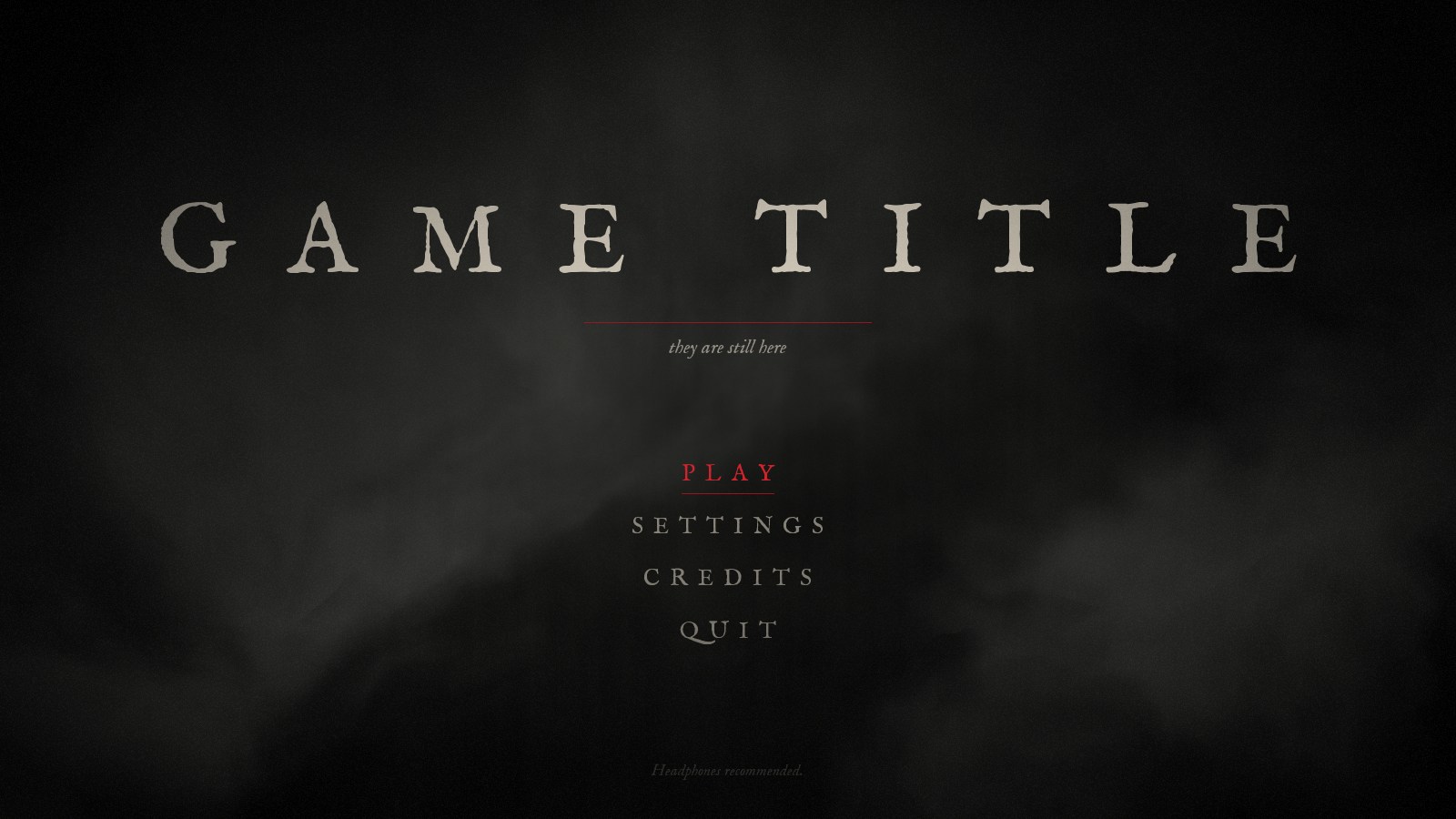
Dread style
Dread is for games that should feel wrong from the first screen. A damp wall in the dark, fog that drifts across it, fine film grain and a light that flickers now and then. Old-print serif type, blood red accents, slow fades and a nervous flicker on selection. Made for horror, thrillers and dark mysteries.
- Every Menu Kit screen in the Dread style
- Animated fog, film grain and flickering light
- Slow, heavy fades with a nervous flicker
- Old-print serif font included
- Price
- €10 one-time, VAT included
- Needs
- The free Menu Kit
- Engine
- Unreal Engine 5.6 and later
- Support
- Priority email support
Payment and receipt by Stripe. Already bought it? Download it from your account.
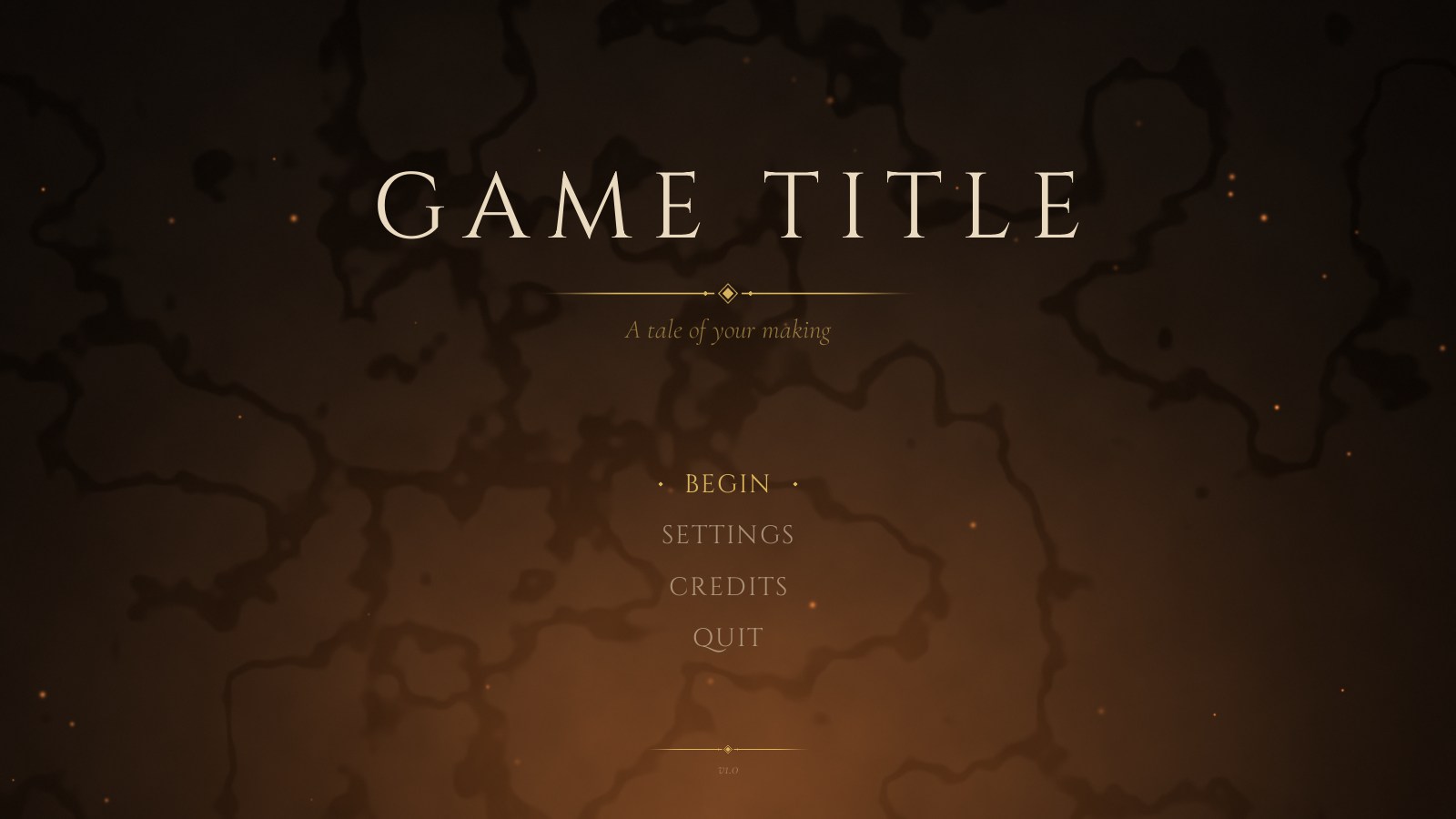
Realm style
Realm brings the warmth of a candlelit hall. Embers rise slowly over old stone, the candlelight breathes, and gold ornaments and diamonds frame a centered layout with classic serif type. Everything rises in gently. Made for fantasy RPGs, adventure games and anything with swords, spells or old maps.
- Every Menu Kit screen in the Realm style
- Animated embers and candlelight over a stone texture
- Gold ornaments, dividers and framed panels
- Slow, graceful rise animations
- Classic serif fonts included
- Price
- €10 one-time, VAT included
- Needs
- The free Menu Kit
- Engine
- Unreal Engine 5.6 and later
- Support
- Priority email support
Payment and receipt by Stripe. Already bought it? Download it from your account.
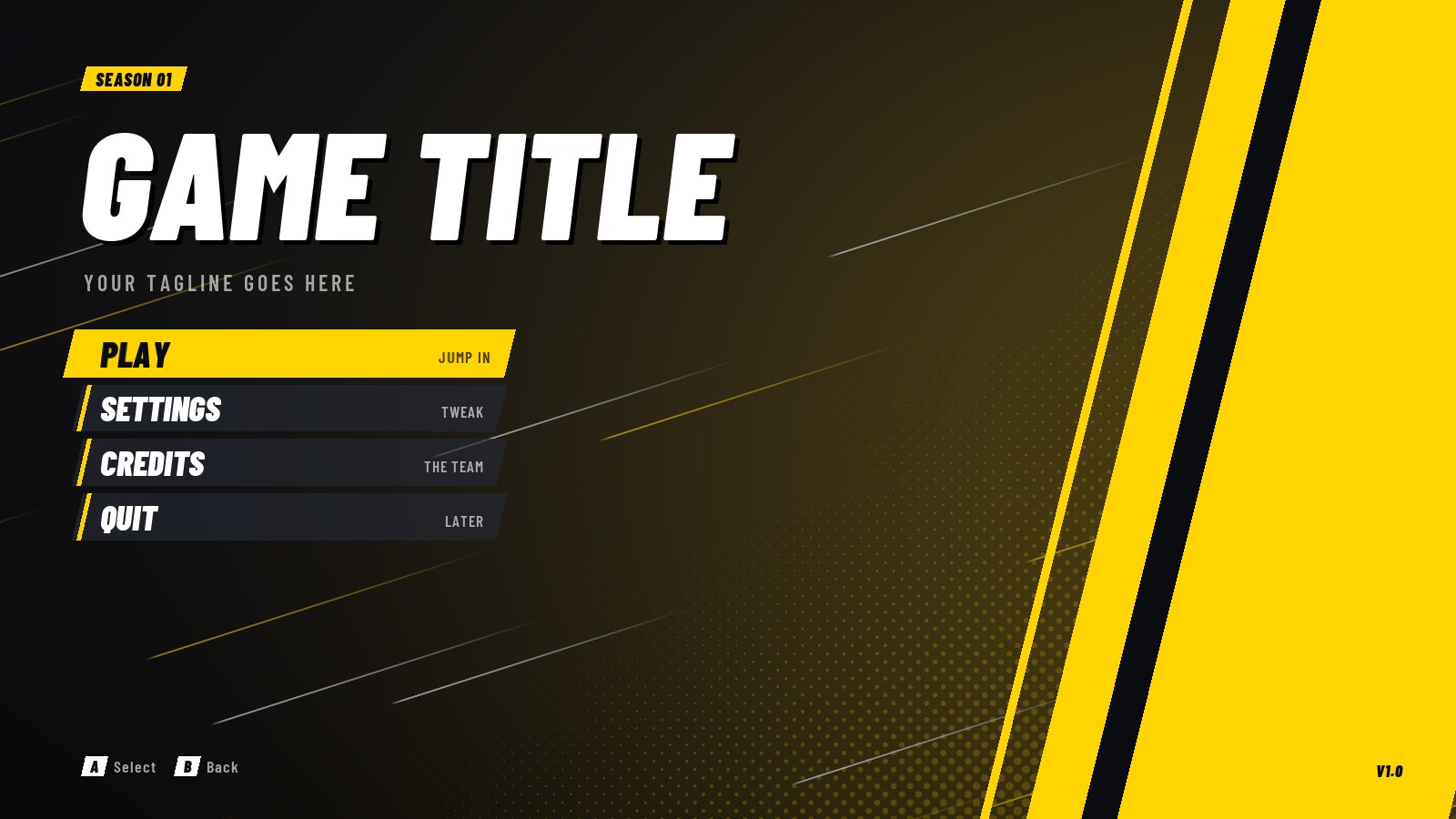
Strike style
Strike is loud on purpose. Heavy italic type with a hard shadow, a slab of electric yellow, speed lines racing across the background and slanted panels everywhere. Buttons grow and kick sideways when selected, and screens slam in and overshoot before they settle. Made for action games, racers, sports, arena and multiplayer games.
- Every Menu Kit screen in the Strike style
- Animated speed lines with halftone dots
- Slanted buttons with short detail labels, key hints and a big loading counter
- Fast overshoot animations
- Bold condensed font included
- Price
- €10 one-time, VAT included
- Needs
- The free Menu Kit
- Engine
- Unreal Engine 5.6 and later
- Support
- Priority email support
Payment and receipt by Stripe. Already bought it? Download it from your account.
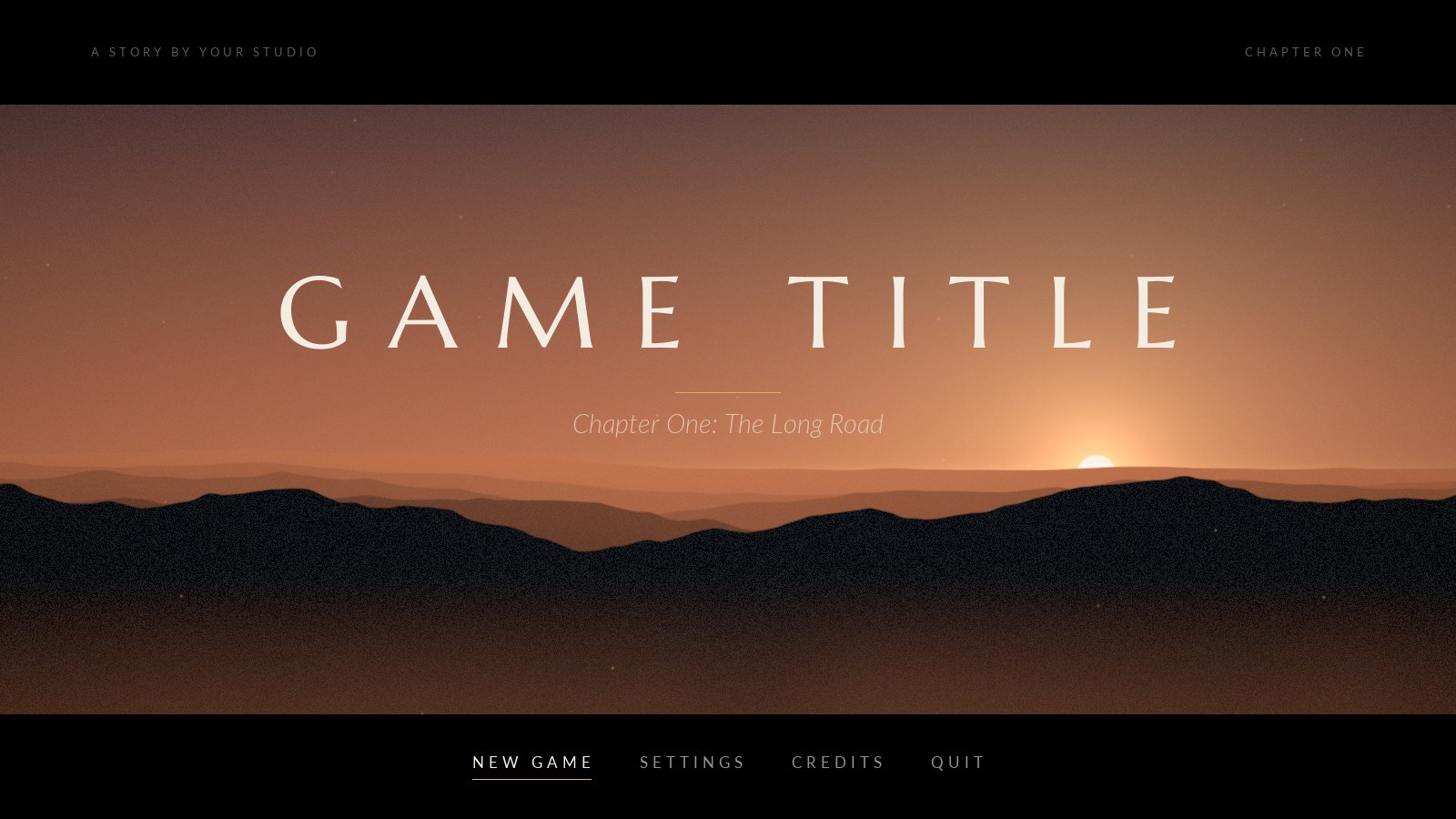
Prologue style
Prologue makes your main menu feel like the first shot of a film. Black widescreen bars open over a dusk landscape. The sun sits low behind layers of mountains, fog drifts, dust floats in the light. The menu lives in the bottom bar like film credits, the title fades in slowly with a gold hairline, and the credits roll like the end of a movie. Made for story-driven games, walking sims, adventures and anything cinematic.
- Every Menu Kit screen in the Prologue style
- Animated dusk landscape with sun, mountains, fog and dust
- Widescreen letterbox bars that open when the menu appears
- Film credits roll and subtitle-style loading tips
- Elegant serif and sans fonts included
- Price
- €10 one-time, VAT included
- Needs
- The free Menu Kit
- Engine
- Unreal Engine 5.6 and later
- Support
- Priority email support
Payment and receipt by Stripe. Already bought it? Download it from your account.
All styles
Every Menu Kit style in one purchase. Install them all and switch between them in Project Settings whenever you like, so each game gets the look that fits.
- Operator: A tactical HUD look with amber accents and glitchy motion.
- Dread: A horror look with drifting fog, film grain and a flickering light.
- Realm: A fantasy look with candlelit stone, rising embers and gold.
- Strike: An action look with electric yellow, speed lines and punchy motion.
- Prologue: A cinematic look for story games: letterbox, dusk landscape, quiet motion.
- Price
- €35 one-time, VAT included.
€50one by one - Needs
- The free Menu Kit
- Engine
- Unreal Engine 5.6 and later
- Support
- Priority email support
Already own some styles? The bundle price stays the same, so single styles may be the better deal for you.
About
Menu Kit gives your game the screens every game needs, ready in two minutes: a main menu, a pause menu, a settings screen, credits, a confirm dialog and a loading screen that loads the next level in the background while it animates.
Every screen is a normal Widget Blueprint. Open it, move things, change the text, swap the colors. There's no hidden framework to fight.
The settings aren't for show. Window mode, resolution, VSync, frame rate limit, resolution scale, all scalability groups, four volume channels, mouse and gamepad sensitivity and invert Y all apply instantly and are saved for the next launch. Mouse sensitivity and invert Y work with Enhanced Input automatically, with no input setup.
It works with mouse, keyboard and gamepad. Arrow keys or WASD move around, Enter selects, Esc goes back, Q and E switch tabs. Long lists like resolution open as a dropdown.
The free version comes with one clean, simple style. When you want a different look, pick a style pack in Project Settings and every screen changes at once.
What's included
- Main menu, pause menu, settings, credits and confirm dialog
- Async loading screen with tips, level name, progress bar and spinner
- 23 settings that really change the game and are saved between sessions
- Your own settings, for example field of view, with one Blueprint node to read them
- Dropdowns for long option lists like resolution
- Full keyboard and gamepad navigation
- Mouse sensitivity and invert Y applied to Enhanced Input automatically
- Reveal animations and screen transitions you set in the Details panel
- Blueprint nodes: Open Level (Menu Kit), Open Screen, Toggle Pause Menu and more
- One clean animated style, plus support for style packs
- Demo maps and full C++ source
The settings
All of them apply instantly and are saved for the next launch.
- Display
- Window mode, resolution, VSync, frame rate limit, resolution scale
- Quality
- Overall quality, view distance, shadows, global illumination, reflections, anti-aliasing, textures, effects, post processing, foliage, shading
- Audio
- Master, music, effects, dialogue
- Controls
- Mouse sensitivity, gamepad sensitivity, invert Y
Styles
5 looks, €10 each. Pick one at the top of the page to see it up close.
All 5 styles for €35 instead of €50.
Every style includes
- 11 Widget Blueprints: the 6 screens plus button, tab, setting row, dropdown list and dropdown item, all editable
- Animated background materials you recolor with a Material Instance
- Textures and fonts, with their licenses
- A style data asset: pick it in Project Settings and the whole game switches
Needs the free Menu Kit and Unreal Engine 5.6 or later.
Free or paid?
| Free | €10 per style pack | |
|---|---|---|
| Features | Every screen, fully working | The same, nothing extra locked away |
| Look | One animated style | A complete new style for every screen |
| Support | Community help on Discord, answered when there is time | Priority email support with faster replies |
| Commercial use | Yes | Yes |
Installing
Menu Kit
- Close Unreal. Extract the zip into your project's Plugins folder (create it if it doesn't exist), so you have YourProject/Plugins/MenuKit.
- Open the project.
- In Project Settings > Plugins > Menu Kit, set Main Menu Level to the level that shows your main menu.
- In that level's World Settings, set GameMode Override to MenuKitMenuGameMode.
- Open WBP_MainMenu, select the Play button and set Level to your first level. Press Play.
The pause menu opens with Esc or gamepad Start. While playing in the editor it’s P, because Esc stops Play In Editor.
A style pack
- Close Unreal. Extract the zip into Plugins, next to MenuKit.
- Open the project.
- In Project Settings > Plugins > Menu Kit > Style, pick the style, for example DA_Strike.
Every screen switches to the new style. Clear the Style field to go back.
Questions
Do I need C++?
No. Everything is set up in Project Settings and Widget Blueprints, and the editor runs the included prebuilt plugin right away. The C++ source is included, but you never have to touch it. To package your game, Unreal compiles the plugin into it, so Visual Studio needs to be installed for that step, as with any plugin that contains code.
Can I edit the screens?
Yes. Every screen is a normal Widget Blueprint: move things, change texts, fonts and colors, add your own buttons. The animated backgrounds are materials, so you recolor them with a Material Instance.
Are settings saved in a packaged game?
Graphics settings use Unreal's own Game User Settings, so they're saved and applied again on the next launch. Volumes, sensitivity and your own settings are saved the same way.
Does it work with a gamepad?
Yes. D-pad or left stick to move, A to select, B to go back, Start for the pause menu, LB and RB to switch tabs. Keyboard works the same way with arrow keys or WASD, Enter, Esc and Q/E.
Can I use more than one style?
Install as many as you like and switch between them in Project Settings. Only the selected one is used.
Can I use it in commercial games?
Yes. Use it in as many of your own projects as you want, commercial ones included. You just can't resell or share the files themselves (see the terms).
Can I buy all the styles at once?
Yes. The All styles bundle gets you every style for less than buying them one by one.
Which engine versions?
Menu Kit: 5.6 and 5.8. The styles work on 5.6 and later.